Applications: the list, recipes and each application
The list of applications, the recipes, one application's pages, the deploy queue, Diagnose, the terminal and cron.
Part of The console, page by page.
Applications
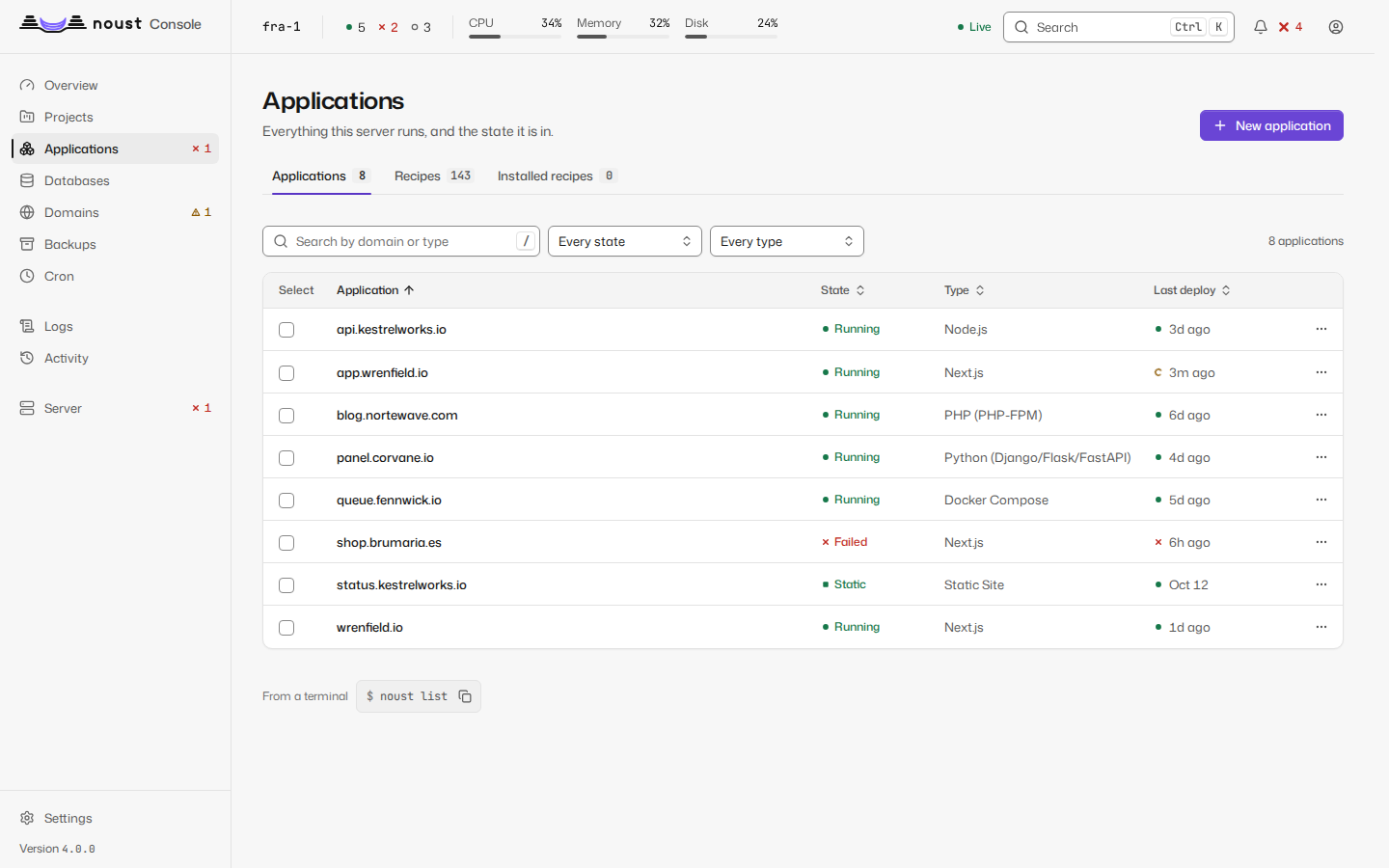
Every application with its state, type, port, last deploy, CPU and memory, filterable by state, type and, once any app carries one, tag. Narrowed to one tag, the page offers Update tagged apps: each app that carries it pulls its source and builds a new release, as Update does, and one with nothing new is skipped unless you tick Rebuild even when there is nothing new. A row's menu also has Promote to another environment (the release that serves goes to the same app in another environment of its project, without being built again) and Clone application (a new app with this one's settings and a domain you give it, in this or another environment; when the app has a database you choose between one of its own and sharing it). See teams.md.
On a phone, rows become cards with their actions always visible.
Each row has a checkbox. With some chosen, Act on N selected opens the plan of an action (restart, update, stop or start): what will be done to each application, and which are left out and why (a static site has no process to restart, an application already stopped is not stopped again, one being deployed is not restarted). Restart N applications then does it one application at a time, in the order chosen, with the server's own words for any that fails and Retry the failed for those alone. Each is the call the application's page makes, so sudo mode, the audit trail and the update queue are the same.
New application (/apps/new) asks for what it needs and nothing else. In Source you give a
Git URL, a path on the server or a Docker image, or choose From GitHub; what you give is read at
once, and a line under the field says what was found, with Change: the detected type (editable),
the commands, the port and the variables declared in .env.example as a form, with secrets flagged
(Detected: Next.js with npm. Port 3000. 2 variables to fill in.). More ways are Compose, a
recipe, an import (an export file, or an application read from a Coolify or Dokploy server with a
read-only token) and a site that already runs. Then Address (a name of your own, whose DNS the
console checks, or, on a server with a public address, a temporary one such as
shop.203-0-113-10.sslip.io, which needs none), Configuration, Variables, Database
(optional: one created and linked before the first build, its connection string in the app's
environment) and Deploy. The stepper lists only the steps that ask something, and the summary
before deploying says what was detected, the address and the variables, each with Change. The
deploy streams the build log until the application answers, and ends on one card: the address with
copy and open, whether HTTPS is ready, and what to do next. On a fleet there is also a Server step,
or switch to the server first. A repository the console cannot clone shows git's own words and this
server's public key, to add at the code host. Leaving with something chosen asks first.
The Source step also offers A running stack, for a Docker Compose stack that already runs on
this server and that Noust did not deploy (one started by its own deploy.sh, say). You give the
domain it serves and the directory it runs from, and under More options its compose file, the
site file that serves the domain, the repository updates fetch from and the branch. Preview
reads the project from the running containers' labels, finds the site, and shows the output of
docker compose up --dry-run verbatim: it must say nothing would be recreated. Adopt then
registers the stack without cloning, cleaning, rebuilding or restarting anything, and installs its
service without starting it. If the rehearsal lists changes, the adoption is refused with
Compose's own output, unless you tick Adopt anyway, recreating what Compose lists after reading
it. Adopting needs sudo mode. See compose.md.
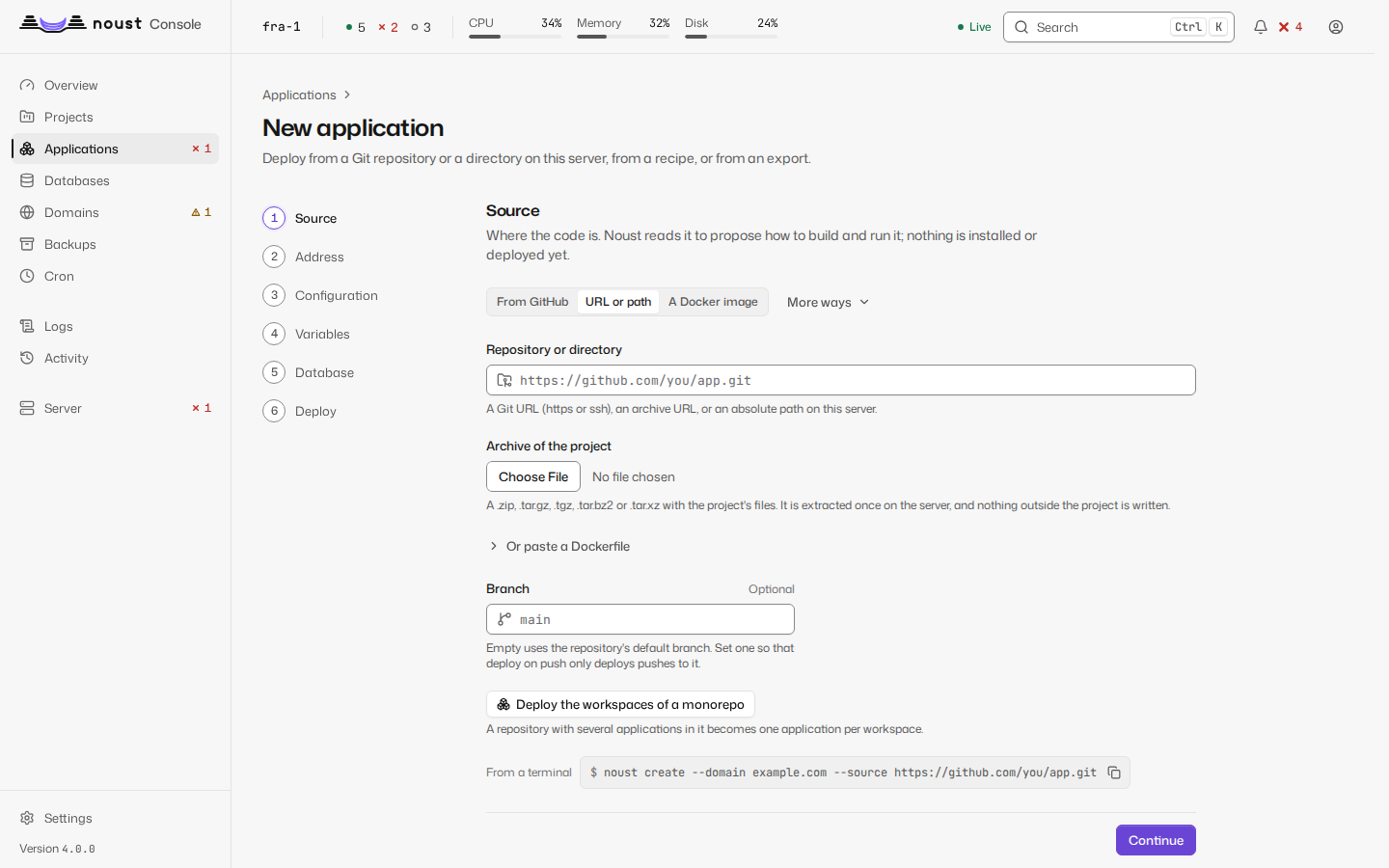
Besides a repository, the Source step offers A Docker image: an image from a registry runs as
a container application, with nothing to inspect (and no source: the server refuses one given
with it). A repository with only a Dockerfile is proposed as a container application too, and
Configuration then asks how its image is made: a Dockerfile (its path, the context, the stage,
build arguments and build secrets) or Railpack, the port the process listens on, its volumes, how it
restarts and, for an image, a private registry's account. A build secret's value and a registry
password are typed into masked fields, sent once and never shown again; the last step names how the
image is made and never a secret. A container's releases are images, so the layout and the folders
kept in shared/ are not offered, and neither is a database: it cannot reach the host's. See
containers.md.
Recipes
The recipes this release ships (noust recipe list), reached from Applications and kept at
/catalog (so are the installed ones, /catalog/installed), each as a tile with a Popular row
before any filter: its logo (an image the server
serves, within the strict policy), name and slogan, its category from a closed list, tags, the
version it pins, the day the recipe last changed, links to its site and documentation, Runs in
Docker for a Compose recipe and what a native one needs (a database Noust sets up, a PHP-FPM). A
recipe this release cannot deploy is listed with the server's reason and no button. Search and the
category, tag and Runs (in Docker or natively) filters are the server's own search, kept in the
address; the list pages at 20, 50, 100 or all recipes. Use opens the wizard on that recipe's
one step: where it answers and the variables it cannot run without, each with what it is for and
the default an empty field keeps (a secret is masked), and Deploy waits for the required ones and
leads to the field. Details opens the recipe's own page: what it runs (image, tag and digest),
what it needs, every variable and where its value comes from, the ports it opens on purpose, what it
will tell you after the install and what each version changed. The install is a job, its output a
click away while it prints.
A recipe's page also lists what installing it needs from this server (memory, disk, the ports it opens, the runtime and the database engines), each met or missing, and the wizard shows the same before anything is made and asks whether to back the new application up every day. Add a recipe checks a recipe you paste against the catalog's schema and its lint and keeps it on this server, apart from the ones Noust ships; a recipe of yours says so on its card. Catalog package shows the signed package that grows the catalog between releases (who signed it, its serial, what is in it) and fetches or removes it. The new-application wizard also takes Compose: it is read first, without running anything, and what refuses it or is worth knowing is shown before it is deployed. See recipes.md.
Installed lists what was installed from a recipe, the version it runs against the catalog's and what changed. Update is the one update (a copy first, the startup check, the previous version back when it fails) queued as a job; a variable the new version asks for and the application lacks is asked for, the ones it has keep their value. An application whose recipe left the catalog says so, in the server's words. See recipes.md.
One application
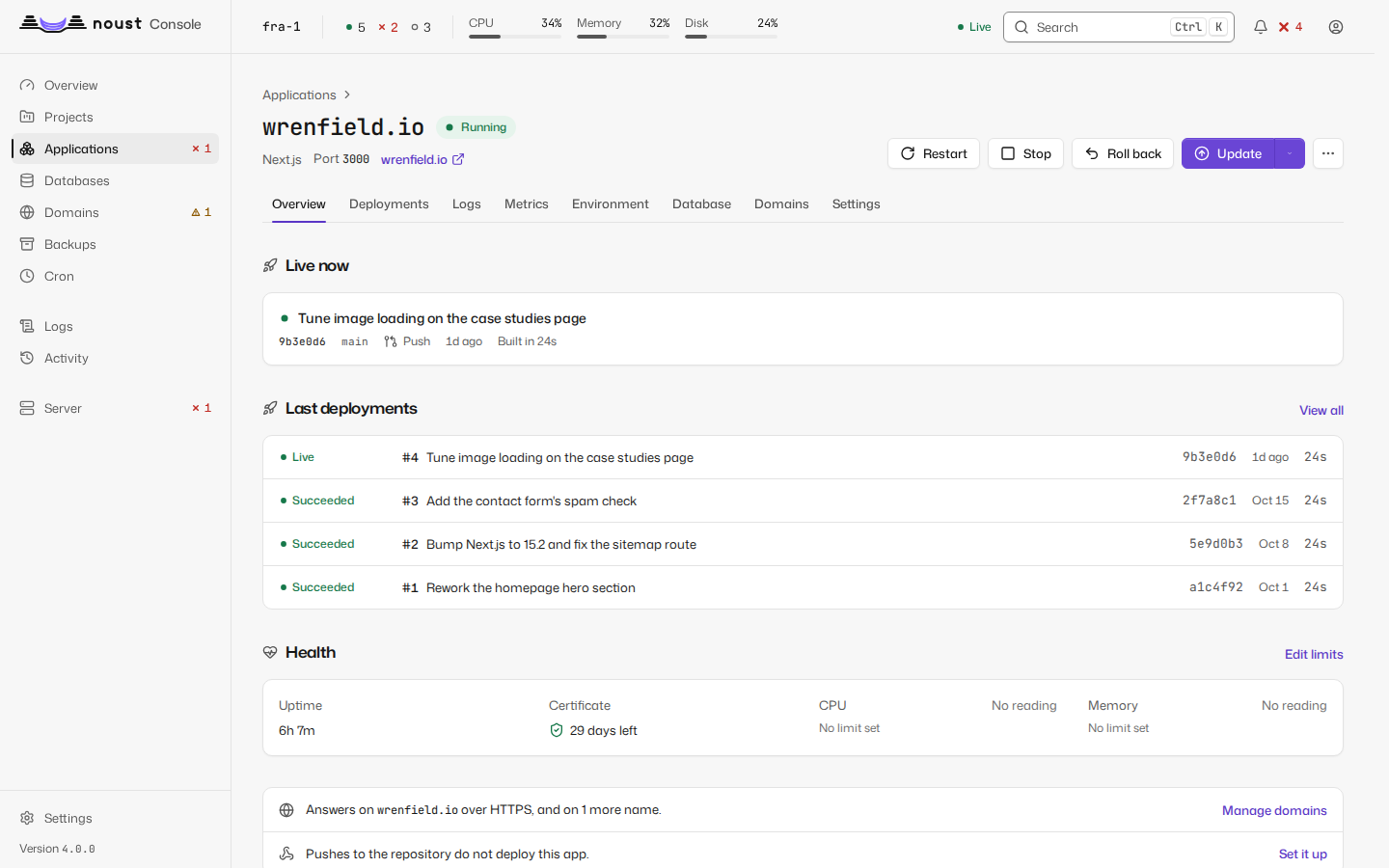
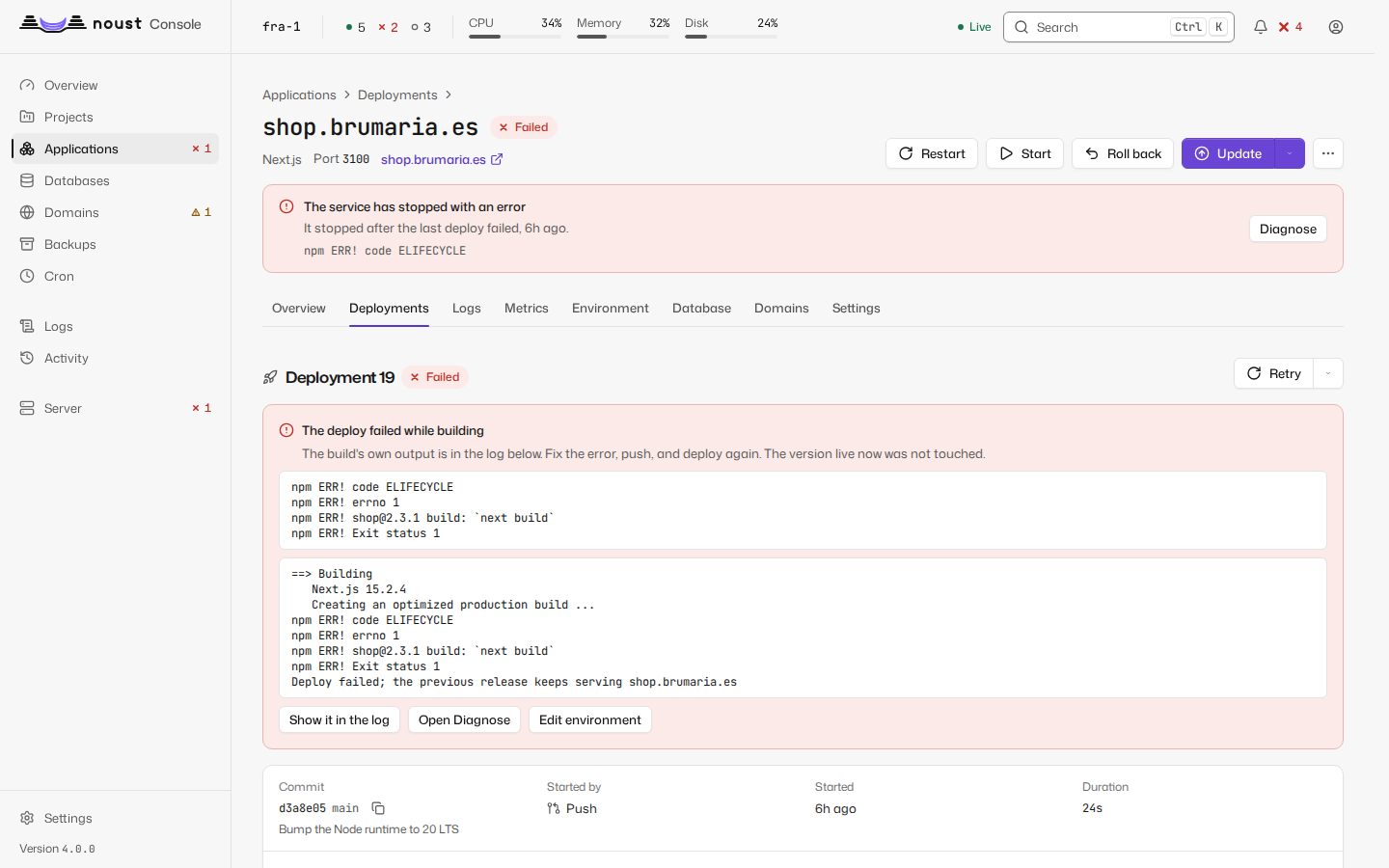
The header shows the domain, state, type, port and a link to the live site. A banner between the header and the tabs appears while a job runs on it, when its last deploy failed or when it is down, with a link to Diagnose. Tabs:
| Tab | What it has |
|---|---|
| Overview | What is live now and what changed, the last deployments (a failed one says which version kept serving), the application's health (uptime, certificate, CPU and memory, with the way to change its limits), its previews, and where it answers and whether a push deploys it |
| Deployments | The application's queue when something builds or waits for it; the deployment history in one list: what serves is marked Live, a failed deploy says which version kept serving, a deploy that was cancelled is drawn as Cancelled and never as a failure, search and filters (state, branch, who started it) are in the address, and each row opens its page or acts from its menu (View log, Roll back to this, Retry, Rebuild this commit, Copy commit); a build made with Build without serving waits at the top with Go live; an application kept in a single folder lists its backups under the list |
| Logs | The unit's journal, live; for a Docker Compose stack or a container application, what the containers printed (all services or one, read again every few seconds), with the unit's journal as one choice |
| Metrics | CPU and memory (requests and errors for a static site) over an hour, a day, a week or a month, against its limits, with deploys marked; or why there is nothing to show. A Compose stack of two containers or more adds CPU, memory, disk and network by container (the busiest three of each), and a site whose access log is read adds who asks for what: requests and errors by the hour, data served, and the pages, networks, status codes and referrers that appear most |
| Environment | The .env, redacted; revealing a secret needs sudo mode. A row opens on press, and a hidden value is never read to be edited: it is kept, or replaced (Replace value). A change shows in its row, the old value struck beside the new one, and the bar at the foot writes only what changed: Save and restart, or Save only from its menu, which leaves the change waiting as "not applied". A pasted file, or more than six changes, is looked over in full first. A value made of references ({{project.NAME}}, {{secret:vault/...}}) is shown as written, not as what it resolved to, and Resolve references reads them again without a deploy. Given to (build and runtime, build only, runtime only) is in each row's menu and in the add dialog, and saved with the values. Given by Noust lists NOUST_URL, NOUST_BRANCH and the rest, read-only. See variables.md |
| Database | The databases it uses, creating and linking one, and its connection string |
| Domains | Primary, aliases and redirects, with a DNS check per name; add a name as an alias or a redirect (Docker Compose stacks that publish a port and monorepos included; see domains.md) |
| Settings | One page per subsection, below |
Changes not applied yet. When an application has been set to something it does not run with yet (a variable, a limit, a command, the sandbox, a mounted file), a chip on the header's state line says how many (2 not applied), and the Environment tab counts its own. The chip lists each change by area with what it needs, a restart, a build or the next deploy; the values of secret settings are never shown, only that they changed, and Restart now (or Build again now) applies them when that is all they need. Deploys paused and Deploys frozen are said the same way, and lead to where they are resumed.
Update is a split button: its arrow holds Update without cache and, on an application with instant rollback, Build without serving. Roll back is one question wherever it is asked from (the header, a row of the history, a deployment's page, Diagnose): which version, what goes back, what stays as it is, and whether automatic deploys will pause. See runtime.md.
Files is in More actions, for whoever may open a terminal: the application's files a folder at a time (the folder is in the address), as the account the application runs as, with edit, upload, download, new folder, rename and delete. Environment files are the Environment's and are not opened here. See runtime.md.
Each deployment has its own page: commit, trigger, duration, a phase timeline, the build log (live while it runs, with "Show the whole log" when it was truncated, and filters by level and text, a switch for the times, and Copy to share, which masks anything that looks like a credential), and on failure a link to Diagnose plus Roll back and Redeploy.
A deployment that ran deploy hooks lists them
under Deploy hooks, in the order they ran, before the new version served and after it did.
Each shows how it ended (succeeded, exited with a code, ran out of time, did not run), how long it
took, the service it ran in on a Compose stack, and the end of its output verbatim; Prisma's
automatic migration is listed the same way. The section also says whether the deploy changed the
database schema, and the list of deployments marks such a deploy with a Database changed
badge. When a hook that runs after serving failed, the page says Deployed with warnings: the
new version serves, nothing was undone, and the hook's output is shown (the deploy_hook_failed
notification says the same).
With instant rollback, rolling back switches current and restarts behind the health gate in
seconds, and is not a job. On an application in a single folder (in place), rolling back
restores a backup and runs as a job. See releases.md.
Going back past a change to the database. Noust puts code back, never a database. When later
deployments changed the schema, every way back asks first: rolling back to a deployment,
activating a release, the Roll back dialog's backups, and restoring a backup's files. Before you
press the button, the deployment's dialog says which deployments changed the schema after it. If
you go ahead, Going back passes a change to the database lists those deployments with the
migrations each one ran, names the backup taken before the first of them and the
noust backup restore command that puts the database back (for a Compose stack,
--databases-only), and Go back anyway repeats the request confirmed. A failed health gate
still puts back what served before, whatever the attempt changed. See
releases.md.
Settings has a side navigation, a URL per subsection, and a save bar ("N unsaved changes · Discard · Save"):
| Subsection | What it has |
|---|---|
| General | Type, port, source, App tags (the labels that group it, edited from here), the branch it deploys from (pin or unpin it), the tags it deploys (Follow tags...: a pattern such as v*; see compose.md), commands, how deploys work, the service and the account it runs as (Give it its own account...: its service, files and .env move to an account of its own and the app restarts once; if it does not answer afterwards everything is put back exactly as it was). On a Compose stack that publishes no port but still has one recorded, A worker reported as down offers Record it as a worker..., which clears the port and judges the stack by its containers |
| Source | How the server signs in to the repository: its deploy key (an SSH key for that repository alone, made on a click or imported, its public half shown to add at the code host with a copy button and a link to the host's page, Test the connection as a deploy would, Replace the key without a moment when the repository has none that works, and Remove) and, for a repository cloned over https, an HTTPS credential (a user and a token kept as a secret, never shown again). Writing a secret asks for sudo mode first. See api.md |
| Container | A container application only: how its image is made (a Dockerfile, Railpack or a registry image), the Dockerfile, context and stage, build arguments, build secrets (their ids, never their values; one can be removed), the port, the volumes, the restart policy the registry account of the image itself (its password is write-only: it is never shown and an empty field keeps it) and the registry accounts it pulls with, chosen among the ones Settings > Integrations holds. A change is stored at once and takes effect with the next update |
| Build | The install, build and start commands, the base directory, the publish directory and the runtime of a type that has a build block (not a Compose stack, a monorepo or a container), where they come from (this application's own settings, the repository's noust.yaml or the type) and that the application's own settings win whole; saving asks for sudo mode, and the application's own settings can be removed. Below them, the System packages the host needs (edited in a drawer, installed with a button), the Build cache and the Process types; and the Build sandbox card: whether it builds in the sandbox or as root and why, Test a sandboxed build, then turn it on (the trial Noust runs by itself before the next update of an app that still builds as root is recorded here like one you ran), the network profile, and building as root with a reason. A Compose stack or a container shows the sandbox and says why it has no commands here. See build.md |
| Releases and rollback | Instant rollback: what it gives you, what changes on disk, the migration plan and a rehearsal, then the migration; releases kept; the startup check; and Zero-downtime deploys (blue/green, which new applications that can run as two copies start with by default; on a Docker Compose stack, the relay, which says what to change first when the stack or its site cannot use it). Instant rollback and zero-downtime deploys say whether they are on in the header of their card |
| Automation | What deploys the app without a person asking and what holds, plans and protects its updates, as rows with no save bar: Automatic deploys (a switch; turning it off pauses what a push, a tag or a schedule deploys, with a reason, and a second switch decides whether a rollback pauses by itself), whether an update is refused when its backup fails, on a Compose stack the copy of the databases before an update, Freeze deploys for an application, Scheduled updates (when it updates itself, with its backup first, and how the last run ended; set in a drawer) and the deploy limits (how many deploys are kept, the time and the signal a unit stops with; also a drawer). A freeze or a pause is also said on the Deployments tab. See delivery.md |
| Compose | A Docker Compose stack only: its options, the networks it joins and the registry accounts it pulls and builds with, saved together from one save bar. See compose.md |
| Deploy on push | The webhook as a guided setup for GitHub, GitLab, Gitea and Bitbucket Cloud, in three steps (the public address, the secret, what to enter at the forge) of which the one the setup is at is open and the ones done can be read again: the public URL (noust web expose-hooks, or the console's own address on a network the forge shares), the secret, the values to enter at the forge, the branch that deploys, and the last pushes received, ignored ones included. When this server's GitHub App already reaches the repository the first step says no webhook is needed. An app that follows tags says so here: releases and tags that match deploy, pushes to a branch do not, and a delivery for an older or unmatched tag is listed as ignored |
| Deploy hooks | The commands each deploy runs before the new version serves and after it does, where they come from (From the repository: the noust.yaml of the running code; or From the operator, which replaces it whole), each with its service, directory, time limit and whether it changes the schema. The operator's hooks are written here as YAML in the shape of a noust.yaml; saving asks for sudo mode and may wait for a second person's approval. An invalid noust.yaml is shown with the reason, and the next deploy fails with it until it is fixed or replaced by the operator's hooks. A static site has no hooks |
| Resources | Memory (MB, at least 64), CPU (percent of one core) and tasks (at least 16), optionally restarting so they apply now |
| Processes | The copies of the web process (each new one answers the startup check before it takes traffic) and the processes that run beside it (workers, schedulers): add, change, scale and remove. See runtime.md |
| Service security | The systemd sandbox of the service (off, default, strict), the folders it may write to, how exposed systemd finds it, applied behind the health gate. See runtime.md |
| Mounts | Configuration files kept for the application and linked into every release (their text is editable here, and needs the permission that reveals secrets), and server folders bound into a container application. See runtime.md |
| Previews | Pull request previews and their settings: where they answer, how many and for how long, which variables a preview is given (only the ones you choose, the default, or all of the app's) and which data (a database of its own, the default, or the app's), each choice that exposes something with one line saying what. Each preview has its Logs (the last build and the service), Update, Stop or Start, and Remove; New preview makes one from an open pull request (when the GitHub App reaches the repository), a branch or a tag; the variables defined for previews alone are listed below them. A Docker Compose application has previews too. The settings also give how a preview is named (a template, with the name it gives drawn beside it), whether to keep search engines out, what to do with pull requests from forks (refuse them, or wait for your approval of each commit, which shows on the preview as Approve and Reject) and a copy of the database as a third choice of data. See previews.md |
| Access | Who may open the site: a password, named users, the addresses allowed, a private network only, how the visitor's address is read, a sign-in service in front of the site, and the behaviour of a prefix of the site. Saved, tested by the web server and reloaded together |
| Protection | What the site limits and sends back: request rate, response headers, HTTP/3, the web application firewall and client certificates. Saved, tested by the web server and reloaded together |
| Export | The application as a file to import elsewhere, and its declaration (noust.yaml): Download the declaration, or Apply a declaration, which can start from what runs now, shows the plan and then every block that differs line by line with a way to put a block back, and applies only what was checked. See declarative.md |
| Delete | Delete the application; removing its files and its certificate are separate choices, both off until you tick them, and you type its domain to confirm |
The deploy queue and cancelling
Builds of different applications run side by side, up to the server's limit (deploy.max_concurrent_builds);
one application builds one thing at a time, so what is asked meanwhile waits its turn and nothing is lost
(see releases.md). The queue is on Activity when something builds or
waits, and on an application's Deployments tab for what is its own:
- every job is a row with its state (queued, in progress, stopping), its place in line ("Next in line", "Place 3 in line") and, for one that waits, what it waits for in the queue's own words, set in mono: the update of the same application that is running, a free build slot, a job that changes the whole server;
- a request for an update that is already waiting is merged into it (the last push wins, nothing builds twice): the row says "1 request merged into this one", and pressing Update says it joined the waiting one;
- the server's limits are in the panel's header ("1 of 2 builds running", "3 of 25 waiting"); a request the queue has no room for is refused, and the console says so with the seconds the server asked to wait ("Try again in 30 seconds, or cancel what no longer needs to wait"), and the server's own sentence under it;
- Cancel is on each row and on the job in hand under an application's header. A job that waits is taken
out of the line, after one question. A deploy or an update that is building is stopped: the question says
that the release it was making is removed, what serves now is not touched and the next request starts. Once
its release starts to be activated, or when the application builds in the folder that serves (a single
folder, a Compose stack), or for a job that is halfway through changing the system, the button is disabled
and the reason is written beside it. A stop that was asked shows Stopping until the build has wound down.
The same is
noust deploy cancel.
A deploy that was cancelled is recorded as cancelled, with who cancelled it: the history, the deployment's page and the overview never draw it as a failure and never raise it.
Diagnose
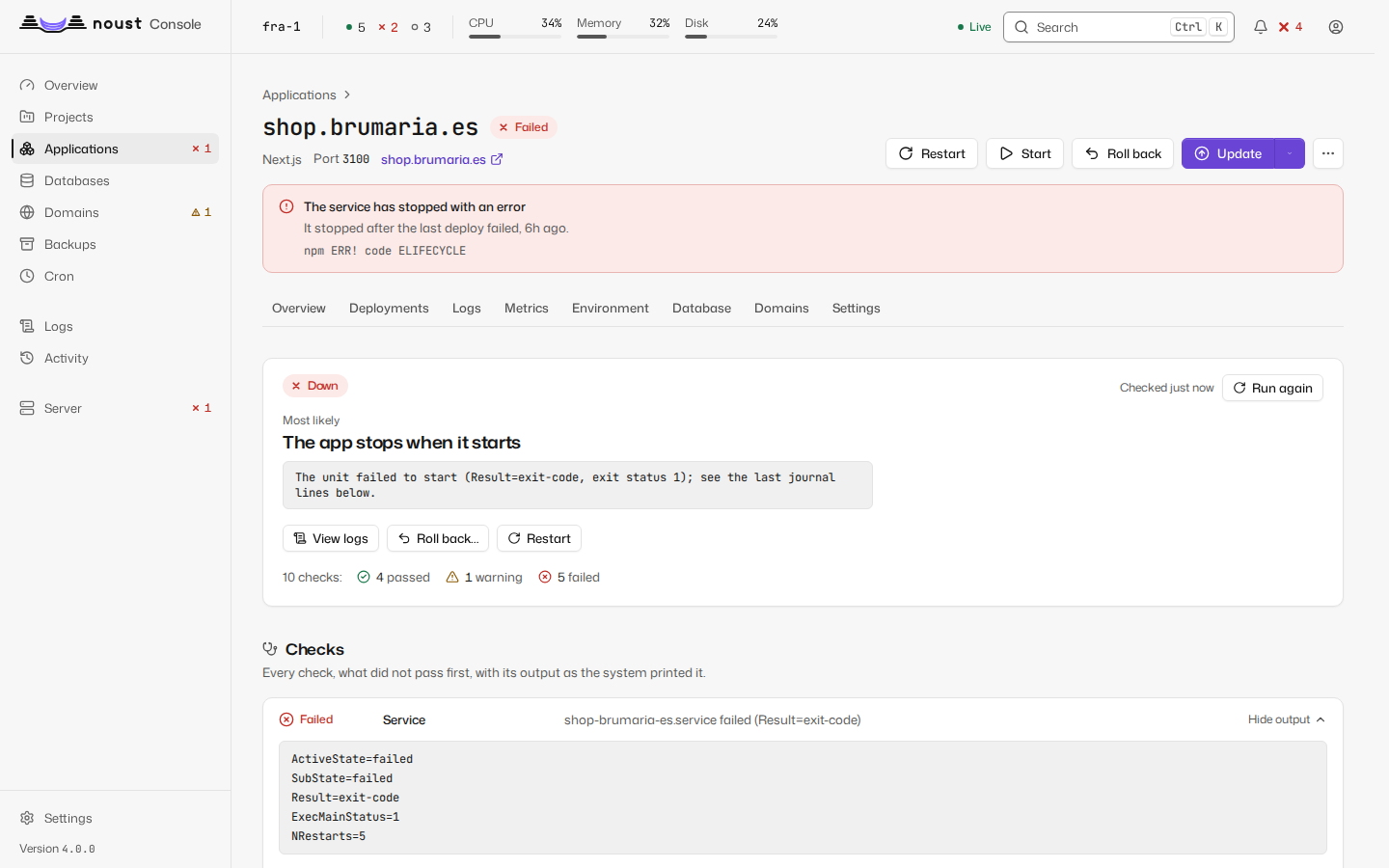
Reached from the application's banner, or /apps/<domain>/diagnose. Correlates the unit's
state, the port it listens on, an HTTP probe straight to the application and one through nginx,
the last journal lines, nginx's error log for the domain, the certificate, the last deployment,
OOM kills in the last seven days and disk space. The most likely cause comes first, with each
check's evidence verbatim. Every probe only reads. The same report is noust diagnose DOMAIN. For an
application that restarts in place on every update and could update without a cut, it also says so, above the
checks, with a link to the setting that turns it on.
A Docker Compose stack that publishes no port (a worker) has no port or site to probe: it is
judged by its containers, and the evidence is their state and the last lines of docker compose logs; when a port is still recorded for it, the report says so and names noust app headless.
Terminal
Off the tab strip, under More actions > Terminal (/apps/<domain>/terminal): a shell as the
account the application runs as, in its sandbox and with its environment (a stack's, in its
container), and below it Run a command once, which splits what you type into the program and
its arguments, shows the list it will run, and shows the output as the job's log. The server's own
root shell is Server > More actions > Open a terminal, off until an administrator turns it
on. Both need sudo mode, are limited in time and recorded in the audit trail. The page is drawn on
a canvas, with a text view for screen readers; Escape, then Tab, leaves it with the keyboard. See
Terminal and one-off commands.
Cron
Scheduled commands as systemd timers: create or edit with a preview of the next runs, run now, enable, disable, and each job's recent runs with their output and exit status. A job can be given the longest it may run and, for an application that is a Compose stack, the service of the stack it runs in (see compose.md).