The console, page by page
The browser console: how it is laid out, the features that are on or off, live updates and themes, and a page for each of its parts.
The Noust console is the browser interface to a server running Noust. It is a single-page
application built into the package and served by noust web start: no Node, no build step
and no CDN at install time, and nothing is loaded from any other origin at run time. It is a
client of the same API scripts use, so everything on screen is something the API
can do.
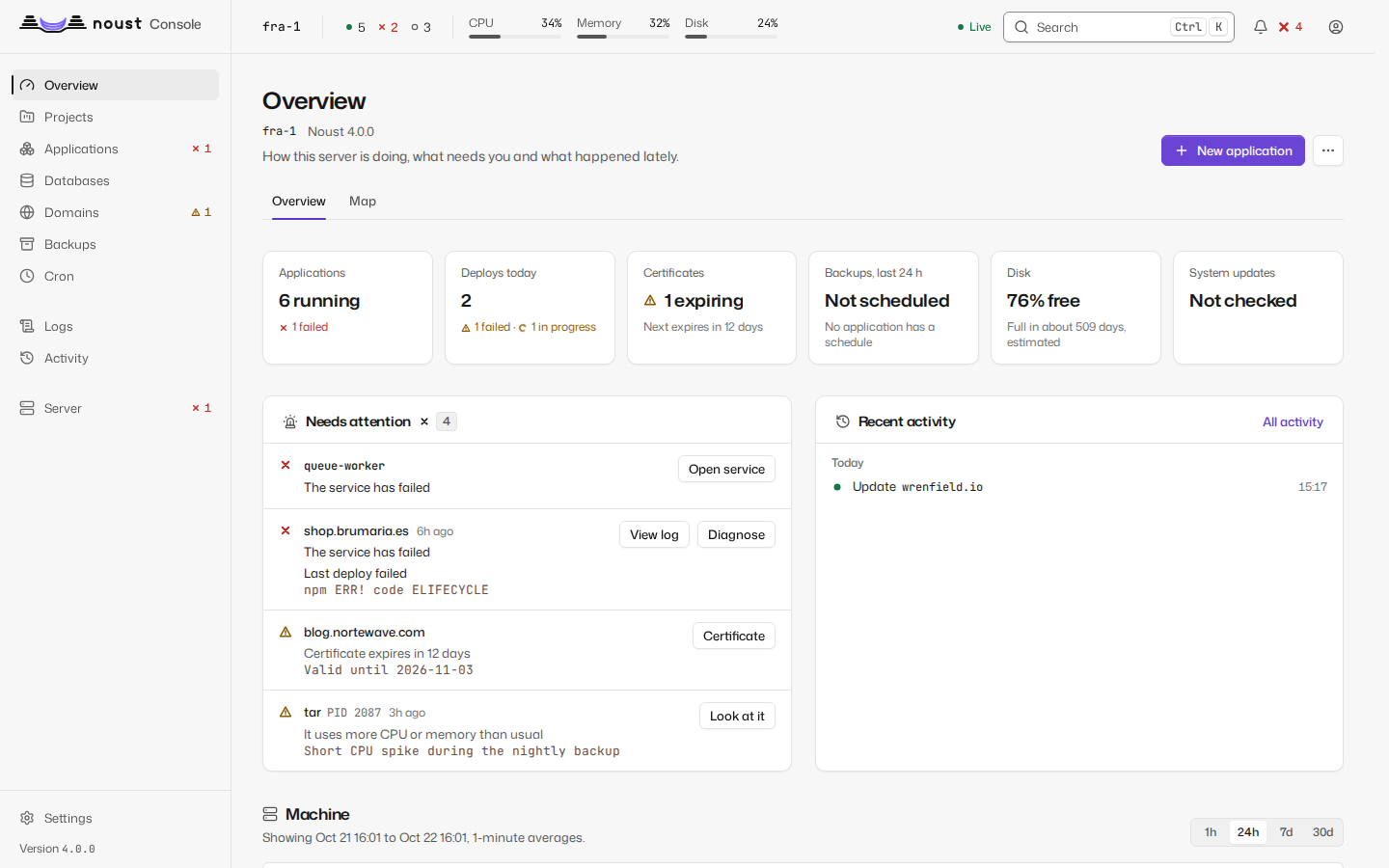
Each part of the console has a page of its own:
- Start the console and sign in
- Overview, map, charts, activity and logs
- Fleet
- Applications: the list, recipes and each application
- Domains
- Databases
- Backups
- Server
- Settings
- Keyboard
- Accessibility
Layout
- Sidebar, in three groups: what runs (Overview, Projects, Applications, Databases, Domains, Backups and Cron), what happens (Logs and Activity) and the machine (Server). Projects is where teams, projects and environments live, and appears once they matter on the server. Settings is at the bottom. On a narrow screen the sidebar becomes a menu.
- The scope selector, at the head of the sidebar (in the top bar on a narrow screen), on a central
or a server that has others: one server, All servers (the fleet) or This central (its own
servers, security and tokens). The sidebar follows it: All servers and This central list the
fleet's seven pages, Overview, Servers, Applications, Certificates, Backups, Updates and Activity.
/n/<server>/...keeps the choice across a reload, the last server is remembered, and every page for one server shows its name above the title. A lone server draws no selector. - Top bar: the machine strip (host name, uptime, load, CPU, memory, disk, units running and failed), the command palette, the inbox and the session menu (account, sign-in security, theme, language, keyboard shortcuts, sign out). The inbox is a bell: Needs you lists what is wrong while it is wrong (a failed application, a certificate about to expire, an alert that fires, a probe that is down, a request waiting for your decision, a Noust or a recipe with a newer version), each row with one button that goes to it, and Recent keeps the last 30 things the server said while this tab was open. The history is Activity.
- The browser tab is titled
<page> - <hostname> - Noust.
Every page follows one of the templates in DESIGN.md: a list, a detail page with tabs, settings with a side navigation, the dashboard, a wizard, a file editor, or the sign-in column. Colour means state and nothing else: green running, amber in progress, red failed, grey stopped, and violet for what you can interact with; chart series have a palette of their own. Every state also has a shape and a text label. When a system tool fails, its own output is shown verbatim in a monospace block, with the suggested fix above it.
Features that are on or off
A page that configures a feature says its state beside the setting, as a pill: a colour, a glyph and a word at once, so it reads without reading the sentence under it. The setting is a row, with the switch at its end and, when turning it on or off has a risk, the risk in one line and the confirmation that goes with it.
| State | Shown as |
|---|---|
| On | The running green, a glyph and "Enabled" |
| Off | Grey, a glyph and "Disabled", with what being off means for you |
| On with a problem | Amber and a warning triangle, never green: it is on but cannot do what it says ("Enabled, but no channel"), with the action that fixes it |
The state is a row on Settings > Channels, Console address, MCP, Approvals and Automatic updates (in About Noust), the second factor in Account > Sign-in security, scheduled backups on the Backups page, automatic updates on Server > Updates, and in an application's settings for instant rollback, zero-downtime deploys, builds in the sandbox and pull request previews. See DESIGN.md.
Live updates
The console holds one Server-Sent Events stream for the machine strip, charts, application states, job progress and notifications, and opens a WebSocket for a log or a running job while you look at it. The machine strip says Live while that stream keeps the readings current and Reconnecting when it does not. If the connection drops it reconnects with backoff and refreshes everything it shows. Log viewers render ANSI colours, search, follow the newest line (pausing when you scroll up, with a "Jump to latest" button), wrap, copy and download. When the output has levels, a chip for each (error, warning, info, debug, with its count) keeps only the levels you choose, the line numbers stay those of the whole output, and copy and download take what is shown; the time column can be hidden, and the viewer can take the whole screen.
A job runs on a thread of the console, so a console that restarts ends the jobs it was running:
they are marked "Interrupted by a panel restart". The exception is work that runs in a transient
systemd unit of its own (applying operating system updates, and Noust updating itself), which
keeps going when the console restarts, and a noust package among the updates is precisely what
restarts it. The job records its unit, and the console that starts again follows it
instead of failing it: when the unit ended well the job completes with the unit's output appended
to its log, when it failed the job fails with systemd's result and the unit's own words, and when
it is still running the job stays running, its log grows as the unit writes, and it ends with the
unit, or gives up after a deadline and says how to follow it. A job with no unit recorded is still
marked interrupted.
Themes
Light, dark, or the system's (the default), from the session menu or the command palette.
The choice is kept in the browser's local storage (noust.theme) and applies to every open tab.
From the terminal
--open on noust list, noust status, noust logs, noust db list, noust backup list and
noust monitor status prints the matching console URL, and opens it when a display is
available. The address comes from web.host and web.port in the configuration (Settings >
General), which only affect these links: where the console listens is decided by the options
of noust web start.