Run a central
What a central is and what it cannot do, installing one on a NAS, a Docker host or a VPS, its first accounts and its certificate.
A central is a Noust whose job is to manage your other servers. It opens an SSH tunnel to each of them and drives them through their own API, from one console. It can be:
- a container on a NAS or any Docker host (the recommended home for it: it only dials out, so nothing is opened on your router), or
- a VPS, either one that only manages the fleet or a server that also deploys its own applications.
A central in a container is a hub (central.role = hub): it deploys nothing itself.
Applications, sites, certificates, databases and the rest are refused there with a message,
and the console hides them. Everything else (the console, tokens, two-factor, the fleet)
works as on any Noust.
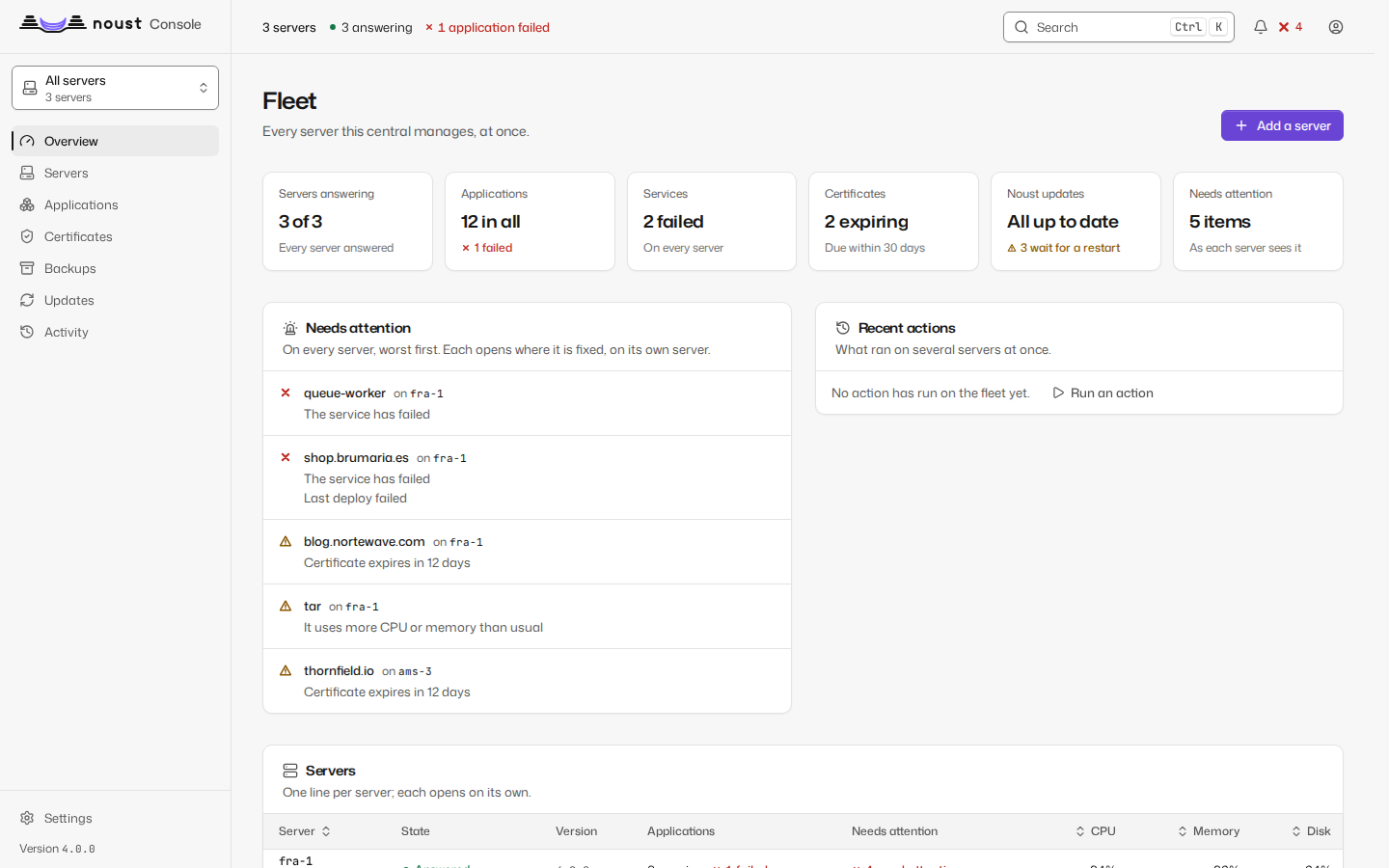
The console's own fleet pages (a central's, never a plain server's: All servers in the scope selector) show every server it manages side by side - whether it answers, what it runs, what needs attention on each - and the selector switches the whole console to one of them; see console.md for its pages.
What the central cannot do matters as much. It reaches each server as noust-tunnel, an
account noust fleet authorize creates for it there: a system account with no home, nologin
as its shell and * as its password (no password ever matches it). Its keys live in a file of
root's, /etc/ssh/noust/noust-tunnel.keys, which it cannot edit, and sshd itself restricts it
with a block Noust writes to /etc/ssh/sshd_config.d/00-noust-tunnel.conf (or, when sshd
includes no such directory, at the end of /etc/ssh/sshd_config, between marker lines):
Match User noust-tunnel
    AuthorizedKeysFile /etc/ssh/noust/%u.keys
    PubkeyAuthentication yes
    AuthenticationMethods publickey
    DisableForwarding no
    AllowTcpForwarding local
    AllowStreamLocalForwarding no
    PermitOpen 127.0.0.1:<console port>
    PermitListen none
    GatewayPorts no
    PermitTunnel no
    PermitTTY no
    X11Forwarding no
    AllowAgentForwarding no
    PermitUserRC no
    ForceCommand /usr/bin/false
The key line says the same thing again, so a line copied without its options is still contained:
restrict,port-forwarding,permitopen="127.0.0.1:<console port>",permitlisten="127.0.0.1:1",command="/usr/bin/false" ssh-ed25519 AAAA... noust-central:<central>The central's key can open ssh -L to the console's port on loopback and nothing else: no
terminal, no command, no agent, no remote forward, no Unix-socket forward, no other port.
Before sshd is reloaded the change is checked with sshd -t, and afterwards
sshd -T -C user=noust-tunnel,... must show every one of these settings in force; if another
file or Match block wins, the change is put back and authorize says which setting differs.
This works on servers with PermitRootLogin no, and even with DisableForwarding yes for
everyone else. It needs OpenSSH 7.8 or later on the server (Debian 12, Ubuntu 22.04 and later,
Fedora and openSUSE Leap 15 all ship newer).
Servers enrolled by 3.0. Up to 3.0 the key went into root's authorized_keys, and
this page said it could only forward one port. That was not true: permitlisten limits TCP
listeners only, so the same key could ask for a remote forward to a path
(ssh -R /etc/nologin:...) and sshd created that Unix socket as root, anywhere - including
/etc/nologin, which stops every other account from logging in. Move each such server to the
tunnel account (see Moving a 3.0 server to the tunnel account).
noust node list flags the ones still reached as root.
The central never gets a shell on a server, each server decides how far the central may go there (the access ceiling), and each server can revoke it on its own.
The central's tunnels also pin their algorithms: ed25519 host keys only (the one the join
code carries), sntrup761x25519-sha512@openssh.com (post-quantum hybrid) or
curve25519-sha256 for the key exchange, chacha20-poly1305@openssh.com or
aes256-gcm@openssh.com as ciphers, and encrypt-then-MAC MACs only. The central asks its own
ssh -Q once and drops what an older client lacks.
The rest of this guide is on pages of its own:
Install on a UGREEN NAS (UGOS Pro)
- Open App Center and install Docker if it is not there.
- Open Docker > Project > Create. Name it
noust, keep the suggested path, and pastepackaging/container/compose.yamlas the compose file. Press Deploy. - Open Container > noust > Log and copy the line
Access Token: noust_.... It is shown on the first start only. - Browse to
https://<the NAS address>:8443. The certificate is self-signed, so the browser warns once; the log shows its SHA-256 fingerprint to compare with the one the browser shows. Paste the token.
The same with SSH on the NAS, in a folder holding compose.yaml:
sudo docker compose up -d
sudo docker logs noust          # the token and the certificate's fingerprint
To keep the data in a folder of the NAS instead of a Docker volume (easier to back up with
the NAS's own tools), create it for the container's user first and switch the volumes:
line in compose.yaml:
sudo mkdir -p /volume1/docker/noust
sudo chown 10001:10001 /volume1/docker/noust
Install on any Docker host
docker volume create noust-data
docker run -d --name noust --restart unless-stopped \
  -p 8443:8443 -v noust-data:/data \
  --read-only --tmpfs /tmp:size=16m --cap-drop ALL \
  --security-opt no-new-privileges:true \
  ghcr.io/perkybeet/noust:latest
docker logs noust
The image runs as uid 10001 with a read-only root filesystem and no capabilities; everything
it keeps is under /data.
| Variable | Default | What it does |
|---|---|---|
NOUST_ALLOW_IP |
loopback, 10/8, 172.16/12, 192.168/16, fc00::/7 |
Who may open the console, space- or comma-separated. Wins over web.ip_whitelist. |
NOUST_TLS_CERT, NOUST_TLS_KEY |
a self-signed pair minted at the first start | Your own certificate, both on the volume. The recommended way: see The console's certificate. |
NOUST_TLS_NAMES |
none | Names and addresses to add to the self-signed certificate, space- or comma-separated (central.example.com 192.168.1.50): a container only sees its own addresses, not the NAS's. |
NOUST_DATA_DIR |
/data |
Where everything lives. |
NOUST_CENTRAL_ROLE |
hub |
Set by the image; a container cannot deploy. |
On a VPS
On a VPS, the central is a normal Noust installed from the packages; there is no container
and no noust central run.
-
A VPS that also deploys applications stays
central.role = server(the default). It manages the fleet from the same console it already has: nothing to change. -
A VPS that only manages the fleet: install Noust, then
Shellnoust config set central.role hub noust web enable --host 0.0.0.0 --port 8443 --self-signed --allow-ip <your address or VPN range>or keep the console on loopback behind your own reverse proxy (
noust web enableand--trusted-proxy). A central reachable from the internet is the one thing to avoid: prefer a VPN or an SSH tunnel to it (ssh -L 8443:127.0.0.1:8443 root@central). A hub has no nginx sites of its own, sonoust console expose(a name, a certificate and an allow-list through Noust's nginx, docs/console.md) is for a central that also deploys,central.role = server; a hub serves its own TLS, as above.
noust central run works on a VPS too (as root, or with NOUST_DATA_DIR pointing at a
directory its user owns), but noust web enable is the supported way to run a console as a
service there.
First sign-in and accounts
- Sign in with the token from the first start. A central with no accounts opens Create the
first account: an administrator, and (recommended) a security officer for another person.
Or from the command line:
docker exec -it noust noust user create alice --role admin. - Sign in as that account and enrol its second factor, an authenticator app or a passkey. Every account must have one, and a central refuses to add its first server without it. From then on the access token is emergency access only.
- Lost the token?
docker exec -it noust noust web token --newissues another and retires the old one.
The central's accounts are the ones that matter for the fleet: operators reach every server
through the central, and each server receives the operator's name with every call
(X-Noust-Actor) and what that person may do (X-Noust-Actor-Permissions; roles are editable, so a
role's name does not mean the same on two servers). The server grants those permissions within its
ceiling for the central (below), and never what no central may have: its accounts, security settings
and audit trail. A server before 4.1 reads the name of the widest role of 3.1 the person holds all of
(X-Noust-Actor-Role) and decides by its own table. A server's own accounts, tokens and second
factor are never the central's to change.
docker exec -it noust noust central status shows the role, where the data is, the
certificate's fingerprint, who may connect, whether the secrets are sealed, how many
servers there are and whether two-factor is on.
The console's certificate
The central holds the keys of the whole fleet, so its console is served over TLS with a
certificate your browser really trusts. The way to get that is your own: a certificate from your
organisation's CA, or from Let's Encrypt for a name of yours, with NOUST_TLS_CERT and
NOUST_TLS_KEY (or --tls-cert/--tls-key outside the container). Chrome and Firefox also
refuse passkeys on a certificate they do not trust, so this is the setup they need.
Without one the first start mints a self-signed certificate: ECDSA P-256, valid 825 days, with
subjectAltName for the host name, the machine's FQDN, localhost, the addresses of its
interfaces and whatever NOUST_TLS_NAMES adds (every current browser ignores the common name,
so a certificate without names could not be trusted by any means). Its fingerprint and expiry
are in noust central status and in the first lines of docker logs. A pair from an earlier
version (RSA, no names) is replaced once, on the first start of 3.1, and the browser asks about
the new fingerprint once. A self-signed certificate that expires is replaced at the next start.
The console accepts TLS 1.2 at the least, and of the TLS 1.2 suites only ECDHE key exchange with
AES-GCM or ChaCha20-Poly1305. web.allowed_hosts (a list of names, *.example.com allowed)
makes it answer only the names you give, plus loopback and the host of web.public_url; empty
answers any host. Neither a NAS in a cupboard nor a container on a home network is where a
company's central should live: put it on the company's infrastructure, in a management network,
with NOUST_ALLOW_IP naming who may open it.