Add a server to your fleet
Manage a second server from the console of the first, over an SSH tunnel that gives it no shell.
Goal: a second server managed from the console of the first, without giving the first one a shell on it.
Time: five minutes.
You need: two servers with Noust installed, a second factor on your account on the first one (Make it safe to leave alone, step 4), and the first server able to reach the second's SSH port.
Kelmoor runs its console on fra-1, the server it already has, and adds ams-3, at
203.0.113.24. The server whose console manages the others is the central; each server it
manages is a node.
How it works
The central opens an SSH tunnel to each node and drives it through the node's own API, so it
re-implements nothing. It logs in as noust-tunnel, an account the node creates for it, which
sshd restricts to forwarding one port: no shell, no command, no other forward. The node decides how
far the central may go, and can withdraw it on its own.
A server that already deploys applications can be a central as it is: nothing to change on fra-1.
Steps
-
On the central, ask for the node's key.
Shellnoust node key ams-3It prints a key made for
ams-3alone and the command that authorizes it there. In the console: Fleet > Servers > Add a server. -
On the node, as root, run the command it printed. It looks like this:
Shellnoust fleet authorize --central-key 'ssh-ed25519 AAAA...' --name fra-1It creates the
noust-tunnelaccount and its sshd block, installs the key for it, checks withsshd -Tthat the restrictions are in force, keeps the node's console on127.0.0.1as a service, and prints a join code on one line. Your own access token toams-3's console keeps working.To limit what the central may do there, add
--access read(look only) or--access deploy(operate and update applications). The default isadmin; the host itself (SSH keys, sshd, the firewall) stays out of reach unless you add--allow-host-access. -
On the central, add the node with the join code.
Shellnoust node add ams-3 --ssh 203.0.113.24Paste the join code when it asks; it is not shown as you type. The central pins
ams-3's host key from the code, opens the tunnel and checks the token. A host key that changes later closes the tunnel instead of being accepted. -
Check it end to end.
Shellnoust node test ams-3 noust fleet status
What you should see
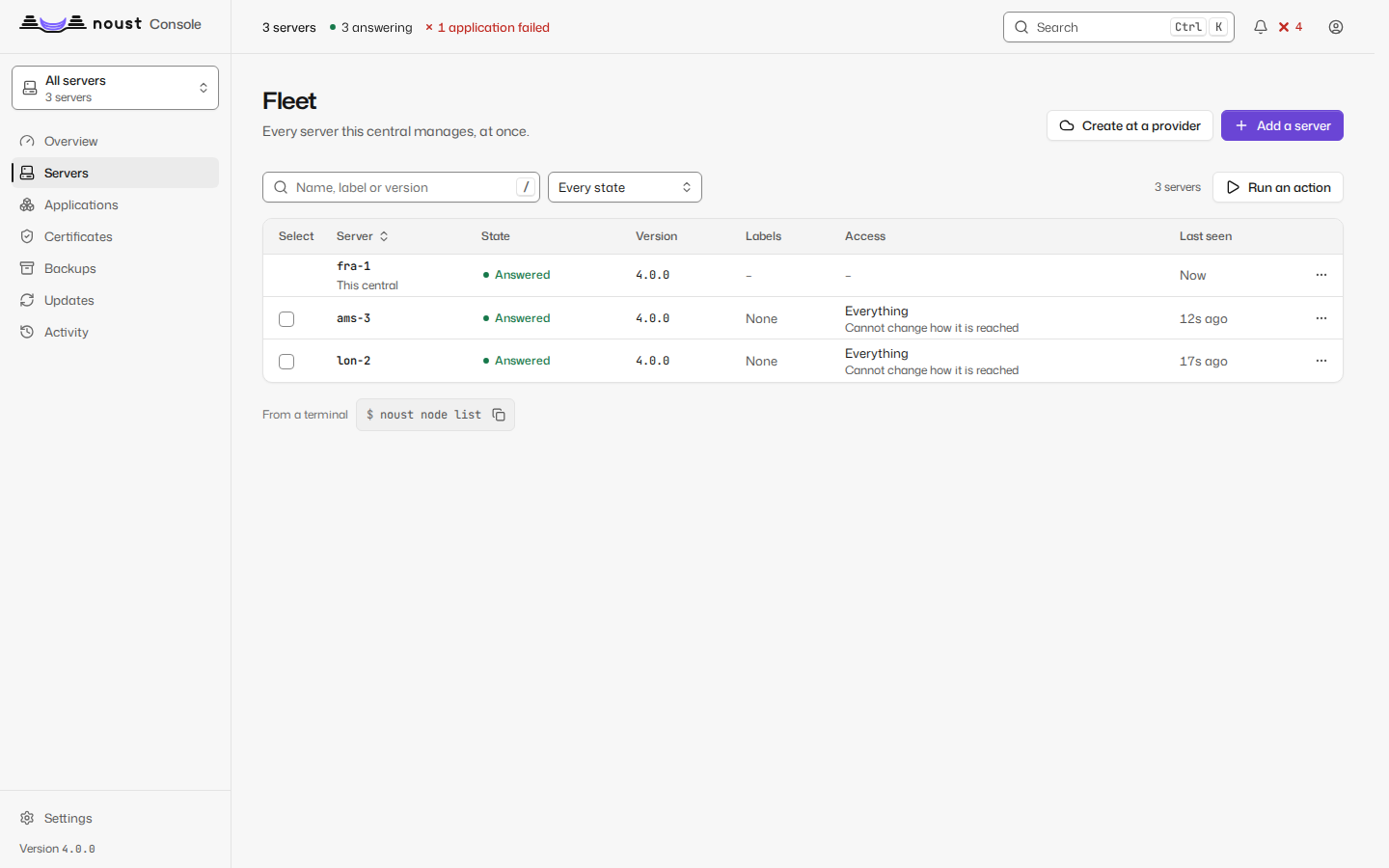
noust node test ams-3 passes the tunnel, the token and the API. noust fleet status lists
ams-3 with its version, applications and certificates.
In the console, the selector at the top now offers All servers and each server by name.
All servers shows them side by side, what each runs and what needs attention; choosing
ams-3 switches the whole console to it.
With a password instead
When the node is new and you only have its address and its root password, the central can do the three steps itself, once:
noust fleet enroll ams-3 --host 203.0.113.24It shows the node's host key fingerprint for you to compare with the one the provider shows, asks for the password without echo, installs Noust there if it is missing, and then reaches the node only through the tunnel. The password is used for those few connections and kept nowhere.
If it fails
noust node addrefuses because two-factor sign-in is not enabled: a central does not add its first server until your account has a second factor. Add it (step 4 of Make it safe to leave alone) and run the command again.- The tunnel does not open:
noust node test ams-3prints ssh's own words. Check thatfra-1reaches203.0.113.24on port 22, and that sshd onams-3is OpenSSH 7.8 or later. noust fleet authorizesays a setting differs: another sshd file orMatchblock overrides the restriction it wrote. It put the change back; the message names the setting and the file.- A server behind NAT, or reached through a bastion: Add servers to a central covers both. Run a central covers running it in a container on a NAS.
Next
Move your applications from Coolify or Dokploy, or see Next steps.